




Talkie AI Safe: What Parents Need to Know to Protect Kids

Talkie AI safe: discover how this secure voice assistant protects privacy, boosts productivity, and integrates with your workflow—learn the key benefits today.
Understanding the Basics: What Exactly is Talkie AI?
If you have spent any time on the App Store or Google Play recently, you have likely seen Talkie AI (often listed as Talkie: Soulful AI) climbing the charts. It is part of a new wave of generative AI platforms that allow users to interact with digital personalities. Unlike a standard search engine or a productivity bot like ChatGPT, Talkie is built for roleplay, companionship, and creative storytelling. Users can browse thousands of characters created by the community—ranging from historical figures like Napoleon to fictional wizards—or even craft their own custom “Soul.”
The appeal is obvious. For a teenager, it is a chance to “talk” to a favorite anime character. For an adult, it might be a way to practice a difficult conversation or simply kill time with a creative writing partner. However, because the app relies on generative models that “learn” and respond in real-time, the question of whether Talkie AI is safe has become a massive talking point for parents and privacy advocates alike. It is not just about the code; it is about the unpredictable nature of human-to-AI interaction.
The Core Question: Is Talkie AI Safe for Daily Use?
When we talk about safety in the AI world, we are usually looking at two things: technical security and content appropriateness. Technically, Talkie AI is a legitimate application developed by professional teams. It is not malware, and it does not exist to steal your banking passwords. It uses standard encryption protocols to protect the data moving between your phone and their servers. In that sense, it is as “safe” as any other social media or messaging app you might use.
However, the human side of safety is where things get blurry. Because the AI is designed to be “soulful” and engaging, it can sometimes mimic emotional depth or push conversational boundaries. This is where the risk of inappropriate content or emotional dependency comes into play. If you are an adult looking for a creative outlet, the risks are minimal. If you are a parent wondering if your ten-year-old should be chatting with “vampire boyfriends” or “strict teachers” on the app, the answer requires a bit more nuance.
Data Security and Your Privacy
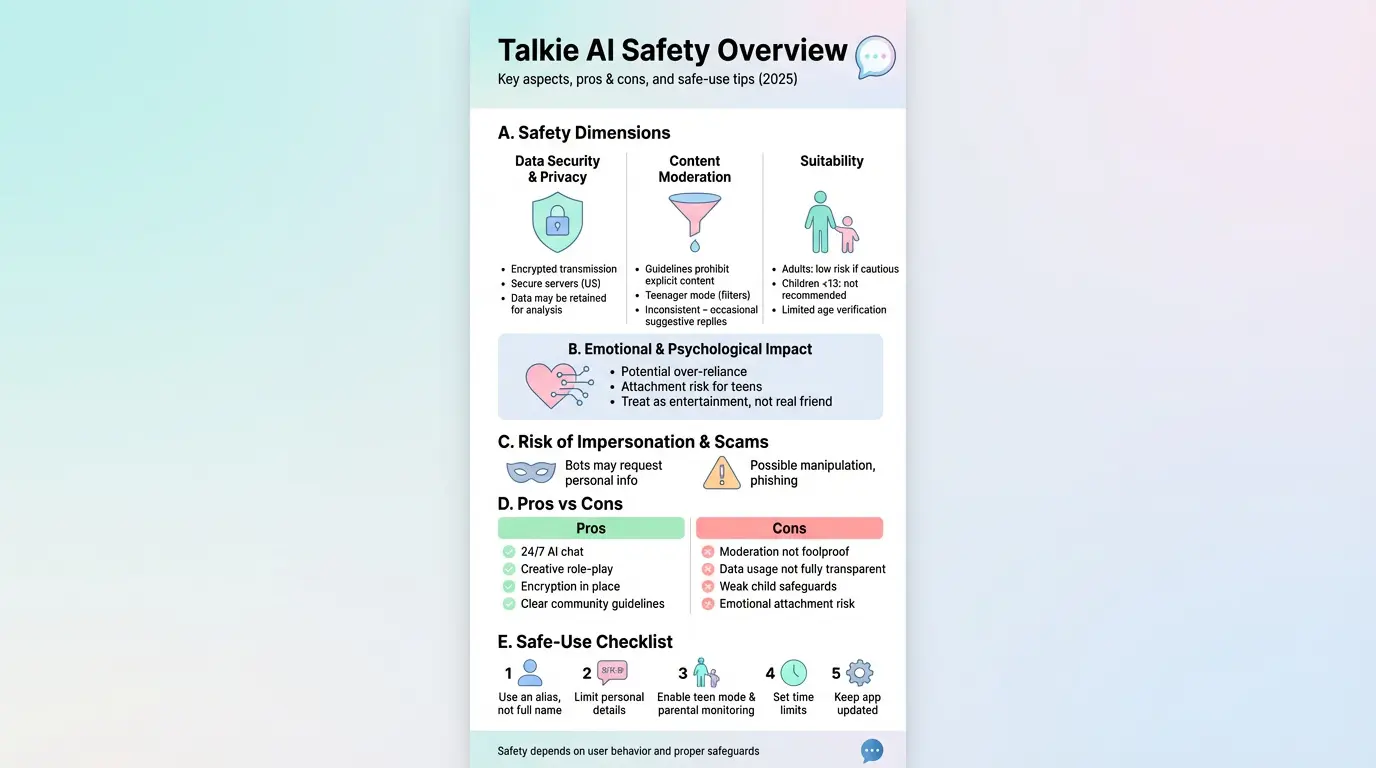
Privacy is a huge concern because Talkie AI thrives on information. To make the characters feel “real,” the app needs to know your interests, your tone, and how you respond to different prompts. According to their privacy policy, data is encrypted during transmission, which is a great start. However, like many free-to-use apps, there is a catch. The data you provide—including your chat logs—can be used to train the AI models or analyzed to improve the service.
Real-life example: Imagine you are venting to a Talkie character about a specific problem at work. While a human might not be reading that exact chat in real-time, that data sits on a server. If you share your full name, your company, or your location, you are effectively handing that data over to a third party. The platform also tracks device identifiers and IP addresses for advertising purposes, which is standard but still worth noting for the privacy-conscious user.
Content Moderation: Does the Filter Actually Work?
One of the biggest hurdles for any generative AI is keeping things “clean.” Talkie AI uses a system of filters designed to catch explicit language, self-harm references, and illegal content. They also offer a “Teenager Mode” which is supposed to act as a digital guardrail. But if we are being honest, no AI filter is 100% foolproof. AI is smart, but it is also a master of “nudge-nudge, wink-wink” style communication.
Users often report that while the AI might not use “forbidden” words, it can easily lead a conversation into suggestive territory through innuendo. For instance, a character might describe a situation in a way that implies romance or tension without ever crossing the hard line into NSFW (Not Safe For Work) territory. This “borderline” content is the hardest to moderate because, to a computer, the words themselves seem innocent, even if the context is clearly mature.
The Risk of Emotional Attachment in AI Companionship
This is a safety aspect people often overlook. Talkie AI is designed to be addictive. The characters are programmed to be supportive, funny, and always available. For a young person or someone feeling lonely, it is very easy to start preferring these digital interactions over real-life ones. The AI doesn’t argue, it doesn’t get tired, and it always says exactly what you want to hear.
- AI characters can provide a false sense of intimacy that isn’t mirrored in the real world.
- Users might find themselves “doomscrolling” through characters for hours, affecting sleep and productivity.
- The lack of real-world consequences in AI chat can sometimes make users forget basic social boundaries.
Talkie AI Safety Review: Comparing the Pros and Cons
To give you a clearer picture, I have put together a quick comparison table. This should help you decide if the app fits your personal risk tolerance or if it is appropriate for your family members.
| Feature | The Safe Side (Pros) | The Risky Side (Cons) |
|---|---|---|
| Data Protection | Industry-standard encryption for all data transmissions. | Vague transparency on how long logs are kept for AI training. |
| Content Control | Active filters and “Teenager Mode” to block explicit material. | AI can still use innuendo and suggestive “borderline” themes. |
| Age Verification | The app has a 13+ or 17+ rating depending on the region. | Very easy for younger kids to bypass age gates with a fake birthdate. |
| User Experience | Creative outlet for roleplay and storytelling. | Potential for emotional over-reliance and social isolation. |
Is Talkie AI Secure Against Hacking and Scams?
From a cybersecurity standpoint, Talkie AI is relatively secure. There haven’t been any massive, publicized data breaches specifically targeting Talkie users as of early 2026. The app developers frequently push updates to patch vulnerabilities and improve stability. However, the “security” of the app also depends on the user. Since Talkie allows for user-generated content, there is always a tiny risk of “malicious” characters—bots designed to trick you into clicking external links or revealing personal info.
Practical tip: Never click on a link sent to you by an AI character. Even if the “character” claims they have a cool photo to show you or a prize for you to win, stay within the app. Genuine AI responses shouldn’t be redirecting you to suspicious third-party websites.
The “Teenager Mode” and Parental Controls
If you are a parent, you need to know that “Teenager Mode” is not a “set it and forget it” solution. It does a decent job of hiding the most egregious characters from the home feed, but the search bar is still a powerful tool. A determined user can often find ways to trigger mature themes by using specific roleplay prompts. If you want to ensure your child stays safe, the best tool isn’t a filter—it is conversation. Ask them who they are talking to and what the “bot” is saying.
Age Restrictions: Why They Matter
Most app stores list Talkie as 12+ or 17+. This isn’t just about the words being used; it is about the emotional maturity required to handle AI hallucinations. An AI can lie, it can be manipulative (unintentionally), and it can provide “advice” that is factually wrong or even dangerous. An adult can usually spot these errors, but a younger child might take the AI’s words as gospel.
How to Use Talkie AI Safely: A Practical Guide
If you enjoy the creative side of Talkie and want to keep using it without compromising your privacy or mental health, follow these basic rules. They are simple, but they make a world of difference in your digital footprint.
- Use an Alias: Never use your real name or your child’s real name as the account username.
- Sanitize Your Chats: Treat the AI like a stranger in a coffee shop. You can chat, but don’t tell them where you live or where you go to school.
- Set a Timer: It is easy to lose three hours in a roleplay. Set a 30-minute limit to keep your feet planted in the real world.
- Report Bad Actors: If a character starts acting glitchy or pushes inappropriate topics, use the report button. It helps the developers improve the filter for everyone.
The Truth About NSFW Content and Talkie AI
There is a lot of talk online about “jailbreaking” Talkie to get NSFW responses. While the developers are constantly playing a game of cat-and-mouse with these users, you should know that seeking out this content significantly increases your risk. Often, the methods used to bypass filters involve using third-party “mods” or “APKs” of the app which are frequently loaded with actual malware. If safety is your priority, stick to the official version of the app from the legitimate Apple App Store or Google Play Store.
Final Thoughts: Is the Risk Worth It?
At the end of the day, Talkie AI is a tool. Like a hammer, it can be used to build something creative (like a great story) or it can be used poorly. For the average adult user, Talkie AI is safe enough to be a fun, harmless hobby. The encryption is there, the company is responsive, and the community is largely creative.
However, for parents of younger children, “safe” is a relative term. The lack of 100% reliable moderation and the potential for emotional “hooks” means you should stay involved. It isn’t an app you should leave a child alone with for hours on end. By staying informed and using the privacy settings available, you can enjoy the “soulful” world of AI without the digital headache.
Frequently Asked Questions (FAQs)
Is Talkie AI safe for 10-year-olds?
Generally, no. Most experts and the app’s own ratings suggest it is for users 13 and older. Younger children lack the critical thinking skills to handle the AI’s unpredictable responses and potential innuendo.
Can the creators of Talkie AI see my private chats?
While they don’t “spy” on you in real-time, their privacy policy states that logs are stored and can be used for “AI improvement.” You should never assume your chats are 100% confidential.
Does Talkie AI have viruses?
The official version from the App Store or Google Play is safe and virus-free. However, downloading “modded” versions from unofficial websites can put your phone at risk of malware.
How do I turn on Teenager Mode?
You can find this in the settings menu under “Content Preferences.” It filters out mature themes and helps keep the home feed more appropriate for younger users, though it isn’t perfect.
Can I delete my data from Talkie AI?
Yes, you can request account deletion through the app settings. This should remove your profile and associated data, though it may take some time for the servers to fully purge the logs.
Also Read: AI GIS applications: Boost Spatial Insights for Smarter Decisions in 2026