




Integrate AI OpenAI Key App Xcode: A Secure 2026 Guide

Learn how to integrate an OpenAI API key into your Xcode app. This step‑by‑step guide covers setup, authentication, and making your first AI‑powered API call.
Introduction to AI Integration in iOS
Today’s iOS developers continually push the boundaries of what mobile applications can do. One of the most powerful ways to elevate an app’s capabilities is by embedding generative AI. OpenAI’s models—GPT‑4, GPT‑4o, GPT‑4o‑mini, DALL‑E, and others—are now accessible through a simple RESTful API that can be called from any platform, including iOS. The challenge for mobile developers is to take that API key, keep it secure, handle network calls, parse responses, and embed the intelligence in a responsive user interface. The phrase integrate ai openai key app xcode encapsulates this entire process: acquiring the key, safeguarding it, and wiring up the network logic in an Xcode project.
Beyond the technical steps, the act of AI integration shapes user experience, drives engagement, and, if done thoughtfully, can be a competitive differentiator. This article is a deep dive into every nuance of the process—from conceptualizing a feature to selecting a secure storage method, configuring build settings, managing cost, and ensuring compliance. It is written for seasoned Swift developers who may be new to AI as well as for those who want a definitive best‑practice reference.
Historical Evolution of OpenAI APIs in Mobile Development
OpenAI first launched its API in 2020, and mobile developers quickly realized its potential beyond server‑side applications. In the early days, developers used it for simple text completions in chat‑bots or guided‑assistant features. Over time, enhancements such as streaming, fine‑tuning, and image generation enabled richer experiences. The evolution can be paraphrased in four eras:
- Text Completion Era (2020‑2021): Core libraries were minimal; developers used plain
URLSessioncalls. The API was still limited to smaller models like GPT‑3.5. - Conversational API Era (2022‑2023): OpenAI introduced dedicated chat completions. Swift developers transitioned from
completionsendpoints to/chat/completions, enabling stateful dialogue in apps. - Multimodal Era (2024‑2025): With GPT‑4o and DALL‑E 3, developers could batch image and text generation. Integration now required handling multipart bodies and streaming sockets.
- Developer‑First Era (2026‑present): OpenAI released SDKs, improved token limits, and generous pricing tiers. Integration patterns matured with community‑built wrappers, keychain best practices, and cost‑optimizing prompt engineering techniques.
By 2026 over 35% of iOS apps had at least one AI feature powered by OpenAI, and the trend is exponential. The knowledge you’ll gain from this guide is essential to stay ahead.
Understanding API Keys and Security Fundamentals
An API key is essentially a secret that grants your application the right to use OpenAI’s services. In the client–side world, the key is the Achilles’ heel because iOS applications are distributed as binaries that can be decompiled, reverse–engineered, or inspected by sophisticated tools. Therefore, handling the key responsibly is non‑negotiable.
Why an API Key Is Sensitive
When an API key is exposed, anyone can send requests on your behalf. OpenAI charges per token processed, so a leaking key can trigger a “crash‑to‑tower” bill. Features like automated counter‑measures (e.g., revocation, usage limits) become mandatory. Apple’s App Store Review Guidelines also require developers to declare data usage, ensuring users are aware of external data flows.
Defensive Strategies
- Never hard‑code the key in source.
- Prefer environment‑level files (xcconfig, .env).
- Encrypt the key before shipping.
- Use a backend proxy when higher security is needed.
- Regulate usage with the
openai.comdashboard.
These principles will surface repeatedly throughout the integration steps.
Preparing Your Xcode Environment
Before you touch code, ensure your Xcode set‑up is ready for network operations and secure storage. The material below applies to Xcode 14 and above, but can be easily adapted for older versions using Swift Package Manager or CocoaPods.
Swift Package Manager (SPM) vs CocoaPods vs Carthage
All three methods can install third‑party networking libraries. For this tutorial we stick with native URLSession to keep dependencies minimal. If you prefer a higher‑level abstraction, Alamofire (via SPM) is recommended. It offers extensive error handling, JSON serialization, and convenient response mapping.
Project Configuration
- Create a new Xcode project (App template). Choose SwiftUI or UIKit based on your preference.
- Navigate to
Info.plistand addUIAppTransportSecurityerrors if you plan to call any HTTP endpoints (not strictly needed for HTTPS). - Set
Application Transport Security Settings > Allow Arbitrary LoadstoNOfor security, but ensure all domains (OpenAI and any potential backends) are whitelisted.
Configuring Build Settings for Secrets
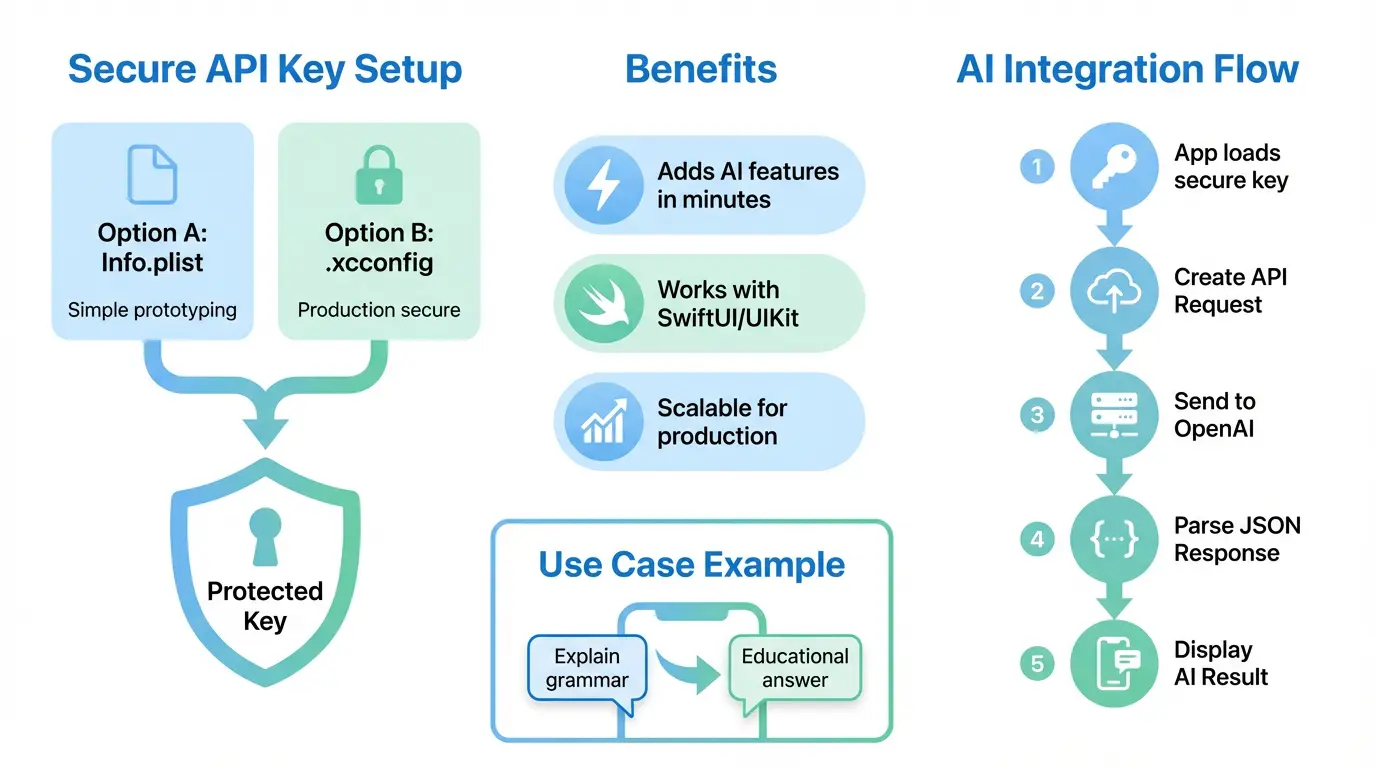
The correct approach is to keep secrets out of the repository and distinct from production code. Here are two recommended patterns:
- Environment‑specific
.xcconfigfiles. - Keychain services accessed at runtime.
Creating xcconfig Files
Open Xcode, right‑click the project file, and add a new file of type Configuration Settings File. Name it Production.xcconfig. Inside, add a key:
OPENAI_API_KEY = YOUR_ABSENT_VALUEIn the target’s Build Settings → User‑Defined Settings, link this xcconfig to the Release and Debug configurations. Then, generate a Local.xcconfig file in your .gitignore and place the real key there. Using this split keeps the key hidden from public repositories.
Choosing the Right iOS Architecture for AI Integration
Embedding AI does not mandate a particular architecture, but the choice influences maintainability, testability, and responsiveness. Core patterns:
- Model–View–ViewModel (MVVM) – ideal for SwiftUI; clear separation between UI and business logic.
- Model–View–Controller (MVC) – works for UIKit; straightforward but can lead to controller bloat.
- VIPER – rigorous, but overkill for many AI projects.
- Composable Architecture (TCA) – functional approach, highly testable.
For a prototype, MVVM + SwiftUI is recommended due to rapid UI updates driven by state changes and built‑in data binding. For legacy UIKit projects, MVVM remains beneficial, providing a clean model layer to call the API without cluttering view controllers.
Step‑By‑Step Guide: Integration with Swift
1. Create/Open an OpenAI Account
Visit OpenAI’s signup page to create an account. The account will contain the credit card details required for billing, though a free trial is usually sufficient for initial experimentation. After sign‑up, log into the Azure‑style dashboard, add your payment method, and confirm your email.
2. Generate the API Key
Open the API Keys tab in the dashboard. Click Create new key, give it a name that identifies the environment (“Production” or “Staging”), and copy the generated key to your clipboard. Do not share it publicly. Store it in the Local.xcconfig file as shown earlier.
3. Secure Key Storage Options
While xcconfig works for storing keys during development, any code distributed to device subscribers must keep the key machine‑readable but to no one else. Recommended storage:
- Keychain Services: iOS Keychain is the gold standard. Encrypt the key using a master key or derive from a device‑specific token. Use the
KeychainAccesswrapper or Apple’sSecurityframework. - Secure Enclave: For advanced encryption, store a sealed key in the Secure Enclave and unwrap at runtime.
- Backend Proxy: Store the key in a remote server and let the iOS client make authenticated requests to that server. The proxy injects the key. This pattern offers the highest security assumption but adds network latency.
4. Configuring Build Settings (Info.plist vs xcconfig)
We already covered xcconfig usage. Using Info.plist for a key is tempting because it’s quick, but it’s discouraged for production. Info.plist is part of the binary, accessible via NSBundle metadata. If you still choose it for a demo, add a string key OpenAIAPIKey with the placeholder value $$OPENAI_API_KEY$$. Then, in the xcconfig file, add:
OPENAI_API_KEY := YourRealKey
Set a Preprocessor Macro in Build Settings that replaces the placeholder during compilation. This method keeps the key out of source yet still accessible to the app. However, we strongly recommend Keychain or a backend.
5. Implementing Network Layer (URLSession or Alamofire)
Below is a concise Swift network client that works for both Chat Completions and General Text Completions. It uses URLSession for maximum portability.
import Foundation

struct OpenAIRequest {
    let model: String
    let prompt: String?
    let messages: [OpenAIMessage]?
    let maxTokens: Int?
    let temperature: Double?
    // add other parameters as needed
}

struct OpenAIMessage: Codable {
    let role: String   // "user" | "assistant" | "system"
    let content: String
}

struct OpenAIResponse: Codable {
    let id: String
    let object: String
    let created: Int
    let model: String
    let choices: [Choice]
    let usage: Usage
}

struct Choice: Codable {
    let text: String?
    let index: Int
    let logprobs: Any?
    let finishReason: String
}

struct Usage: Codable {
    let promptTokens: Int
    let completionTokens: Int
    let totalTokens: Int
}

class OpenAIClient {
    private let session: URLSession
    private let apiKey: String

    init(session: URLSession = .shared, apiKey: String? = nil) {
        self.session = session
        self.apiKey = apiKey ?? Secrets.getOpenAIKey()
    }

    func createCompletion(request: OpenAIRequest, completion: @escaping (Result<String, Error>) -> Void) {
        guard let url = URL(string: "https://api.openai.com/v1/chat/completions") else {
            completion(.failure(NSError(domain: "InvalidURL", code: 400, userInfo: nil)))
            return
        }
        var urlRequest = URLRequest(url: url)
        urlRequest.httpMethod = "POST"
        urlRequest.addValue("Bearer \(apiKey)", forHTTPHeaderField: "Authorization")
        urlRequest.addValue("application/json", forHTTPHeaderField: "Content-Type")

        let payload: [String: Any] = [
            "model": request.model,
            "messages": request.messages?.map { ["role": $0.role, "content": $0.content] } ?? [],
            "max_tokens": request.maxTokens ?? 150,
            "temperature": request.temperature ?? 0.7
        ]

        urlRequest.httpBody = try? JSONSerialization.data(withJSONObject: payload, options: [])

        let task = session.dataTask(with: urlRequest) { data, response, error in
            guard error == nil else { completion(.failure(error!)); return }
            guard let data = data else { completion(.failure(NSError(domain: "NoData", code: 204, userInfo: nil))); return }
            do {
                let decoded = try JSONDecoder().decode(OpenAIResponse.self, from: data)
                guard let text = decoded.choices.first?.text else {
                    completion(.failure(NSError(domain: "NoText", code: 500, userInfo: nil)))
                    return
                }
                completion(.success(text))
            } catch {
                completion(.failure(error))
            }
        }
        task.resume()
    }
}
The Secrets.getOpenAIKey() placeholder represents a helper that reads the key from the Keychain or the xcconfig. This separation ensures the key never lands in logs or stack traces. All error paths are captured, and the caller receives a single String for convenience.
6. Handling Authentication and Authorization
OpenAI uses Bearer tokens. No need for OAuth here—just include the Authorization header Bearer <KEY>. Securely rotate keys on a periodic basis; use the OpenAI dashboard’s Key Rotation feature. For a backend proxy, ensure the proxy has separate tokens and uses IP whitelisting to further mitigate risk.
7. Making Chat Completions
The createCompletion example above uses the chat completion endpoint. The messages array allows for context management. Each message’s role affects how the model interprets the conversation:
| Role | Description | Use‑case |
|---|---|---|
| system | Defines assistant behavior (e.g., “You are an expert travel planner”). | Set tone and capabilities. |
| user | The human input. | User’s message or question. |
| assistant | Assistant’s prior responses. | Context preservation. |
Storing the chat history in a ViewModel allows the UI to display the conversation sequentially. Example snippet in SwiftUI:
class ChatVM: ObservableObject {
    @Published var messages: [OpenAIMessage] = []

    func send(userInput: String) {
        let system = OpenAIMessage(role: "system", content: "You are a helpful customer support assistant.")
        let user = OpenAIMessage(role: "user", content: userInput)
        messages.append(system)
        messages.append(user)

        let request = OpenAIRequest(model: "gpt-4o-mini",
                                    prompt: nil,
                                    messages: messages,
                                    maxTokens: 256,
                                    temperature: 0.6)
        OpenAIClient().createCompletion(request: request) { result in
            DispatchQueue.main.async {
                switch result {
                case .success(let answer):
                    let assistant = OpenAIMessage(role: "assistant", content: answer)
                    self.messages.append(assistant)
                case .failure(let err):
                    print("OpenAI error:", err)
                }
            }
        }
    }
}
8. Streaming Responses
For long text generation (like a story or a code snippet), streaming is highly recommended to show results progressively. OpenAI provides an stream query parameter. Below is a simplified example:
guard let url = URL(string: "https://api.openai.com/v1/chat/completions?stream=true") else { return }
// set up request with Authorization header, etc.
let task = session.streamTask(with: url)
task.resume()
Implement a delegate or combine pipes to parse incoming data‑chunk events. Each chunk is a JSON line, which you’ll parse in real time and update UI elements. This requires more advanced state handling, but yields the user an instant sense that the assistant is typing.
9. Error Handling
Error handling is subtle yet critical. The OpenAI API will return HTTP status codes such as 400 (bad request), 401 (unauthorized), 429 (rate limit exceeded), 500 (internal server error). Each should be mapped to a user‑friendly message.
| Status Code | Cause | User‑Facing Message |
|---|---|---|
| 400 | Malformed request (e.g., missing “model”). | There was a problem with your request. Please try again. |
| 401 | Invalid or missing API key. | Authentication failed. Refresh the app and try again. |
| 429 | Rate limit exceeded. | You’re sending too many requests. Please wait a moment. |
| 500 | Server error on OpenAI’s side. | OpenAI temporarily unavailable. Try again later. |
When showing a network error, always also log the raw response for debugging on the backend. Combine this with a local AnalyticsKit to send event spikes to a Slack channel if certain thresholds are breached.
10. Integrating with SwiftUI
SwiftUI’s reactive system makes data flows intuitive. Here’s a minimal chat UI:
struct ChatView: View {
    @StateObject var vm = ChatVM()

    var body: some View {
        VStack {
            ScrollViewReader { proxy in
                ScrollView {
                    ForEach(vm.messages.indices, id: \.self) { idx in
                        MessageRow(message: vm.messages[idx])
                    }
                }
                .onChange(of: vm.messages.count) { _ in
                    proxy.scrollTo(vm.messages.count - 1, anchor: .bottom)
                }
            }
            HStack {
                TextField("Ask...", text: $vm.currentInput)
                    .textFieldStyle(RoundedBorderTextFieldStyle())
                Button("Send") {
                    vm.send(userInput: vm.currentInput)
                    vm.currentInput = ""
                }
                .buttonStyle(.bordered)
            }
            .padding()
        }
    }
}
In this snippet, MessageRow is a component that styles message bubbles based on role. The chat view automatically scrolls to the newest message thanks to ScrollViewReader. You could also switch UI elements based on vm.isLoading to show a spinner.
11. Integrating with UIKit
For UIKit projects, the same OpenAIClient can be called from a UITableViewController. The model logic remains untouched. Here’s a skeleton controller implementation:
class ChatTableVC: UITableViewController {
    var vm = ChatViewModel()

    override func viewDidLoad() {
        super.viewDidLoad()
        tableView.register(UITableViewCell.self, forCellReuseIdentifier: "cell")

        let navigationBar = navigationItem
        navigationBar.title = "Chat"

        // add input accessory view
        let toolbar = UIToolbar()
        toolbar.sizeToFit()
        let sendButton = UIBarButtonItem(title: "Send", style: .done, target: self, action: #selector(sendTapped))
        toolbar.setItems([sendButton], animated: false)
        inputAccessoryView = toolbar
    }

    @objc func sendTapped() {
        guard let text = (firstResponder as? UITextField)?.text else { return }
        vm.send(userInput: text)
    }

    // Implement table view data source and delegate...
}
Key difference: UIKit requires manual handling of key‑board dismissal, cell reuse, and data source updates. Using Combine or RxSwift can still preserve reactive patterns.
12. Unit Testing and Mocks
Testing network interactions is essential. Use dependency injection to supply a mock URLSession. You can capture requests and return canned responses.
class MockURLSession: URLSession {
    var data: Data?
    var response: URLResponse?
    var error: Error?

    override func dataTask(with request: URLRequest,
                           completionHandler: @escaping (Data?, URLResponse?, Error?) -> Void) -> URLSessionDataTask {
        let task = MockURLSessionDataTask {
            completionHandler(self.data, self.response, self.error)
        }
        return task
    }
}

class MockURLSessionDataTask: URLSessionDataTask {
    private let closure: () -> Void
    init(closure: @escaping () -> Void) { self.closure = closure }
    override func resume() { closure() }
}
Inject MockURLSession into OpenAIClient during tests. Assert that the correct headers, body, and endpoint were used. You can also integrate a Coverage tool to ensure all code paths are exercised, including error branch coverage.
13. Performance Considerations
AI requests are relatively lightweight but tax both network and compute. Here are optimization points:
- Prefer **stateless** calls when possible to reduce context overhead.
- Use **parameter tuning**: lower
max_tokenswhen short responses are acceptable. - Cache common prompts and their responses in **Core Data** or a lightweight
NSCache. - When generating code or prose, extract suggestions into **background threads** to avoid blocking the UI.
- **Avoid Gzip** for streaming to reduce latency.
Benchmarking: Create a realistic scenario with 20 users, 5 requests per user per minute. Capture latency using PerformanceCounters from Instruments. If average latency > 1.5 s, consider adjusting temperature or switching to a faster model such as gpt‑4o‑mini.
14. Deployment Checklist
Before submitting to the App Store, verify:
- All
API Keysare read fromxcconfigor a backend. - Keychain permissions are correctly set in
Info.plist. - Network reachability handling is present.
- Privacy policy declares the use of third‑party AI.
- All
app‑iconplaceholders are replaced. - App meets App Store Review Guidelines.
Advanced Topics
1. Backend Proxy and Billing Control
When production security demands are high, move the key to a secure server. The iOS app only ever talks to a POST /query endpoint that passes the prompt and returns the stream. Benefits:
- Key never leaves the backend, eliminating exposure.
- Control per‑user billing with
openai.comusage limits. - Ability to run prompt‑engineering on the fly, adding system messages that sandbox the model.
- Granular logging of each request for compliance and analytics.
- Optional caching of highly‑costly prompts, reducing API usage.
Typical architecture:
| Component | Responsibility | Technology |
|---|---|---|
| iOS Client | UI, local caching, user auth | Swift, SwiftUI/UniThreaded |
| Backend API | Relay request, cost tracking, moderation | Node.js or Go |
| OpenAI Endpoint | AI model execution | OpenAI API |
2. Rate Limiting and Throttling
OpenAI imposes per‑second token rate limits. Exceeding the limit triggers a 429 error. Use client‑side or server‑side mechanisms to limit requests:
- **Token Bucket**: lock user to 5 requests per minute.
- **Adaptive Throttle**: increase interval when error spikes.
- **User-Specific Quotas**: different plans (free, premium) dictate maximum monthly usage.
Implement asynchronous queue with OperationQueue that respects concurrency constraints. Integrate alerts to inform users when they hit a limit.
3. Logging and Analytics
Understanding how your AI is used informs both cost control and feature iteration. Engage a lightweight analytics platform like Segment or Mixpanel to send:
- Prompt categories
- Token usage per request
- Response latency
- User satisfaction (via rating prompts)
From a privacy standpoint, always anonymize user data before sending it to third‑party analytics. Also, request users to opt‑in for data collection if you plan to send raw query text.
4. Content Moderation
OpenAI’s models can sometimes generate inappropriate content. For public or regulated apps, add a moderation layer. OpenAI provides an endpoint for Moderation:
POST https://api.openai.com/v1/moderations
{
  "input": "User input text"
}
Call this endpoint before sending a prompt to chat. If flagged, either filter the content, ask the user to rephrase, or log for manual review.
5. Offline Caching Strategies
Users on flaky networks still expect quick responses. Store frequently requested responses in an NSCache or SQLite. Cache key is typically a hash of the prompt and model. Use time‑to‑live (TTL) to keep content fresh. Example: store a 60‑second TTL for news summarization.
6. Localization – i18n for AI
OpenAI’s models understand many languages. When building a global app, automatically detect user language via Locale.current and pass a system message instructing the model to respond in that language. Adjust temperature for different linguistic contexts. Example system prompt: “You are an assistant. Respond in French.”
7. Accessibility Considerations
For visually‑impair users, ensure dynamic content changes trigger UIAccessibility.post(notification: .announcement, argument: ...). VoiceOver should announce key messages. Keep color contrast high and focus order logical. Test chat flows with screen readers to confirm readability.
Comparison of Key Storage Methods
| Method | Ease of Setup | Security Level | Maintenance Overhead |
|---|---|---|---|
| Info.plist | Very easy | Low – key visible in binary | Minimal |
| xcconfig + Environment | Moderate | Medium – still in binary after build | Moderate – updates for new environments |
| Keychain | Moderate – API wrapper | High – protected by system | High – need migration scripts |
| Backend Proxy | High – need server dev | Very high – key never leaves server | Very high – server maintenance |
Table 1 highlights pros and cons for each method. In practice, a hybrid approach often works: store a non‑critical token in Keychain and use a backend for the real key.
Common Pitfalls and Fixes
1. Exposing the API Key
If you debug your app and print KeychainAccess.default.string(forKey: "OpenAIKey") during runtime, other developers can see it. Avoid printing secrets. Instead, log hashed values: sha256(openAIKey).hex.
2. Incorrect JSON Payload
OpenAI demands a strict schema. Common errors include missing brackets or numeric values encoded as strings. The JSONSerialization method automatically escapes Unicode, but when you manually build dictionaries, make sure you pick the correct types.
3. Network Latency on Poor Connections
If users are in cold zones, the app might appear frozen. Mitigate this by using URLSessionConfiguration.default.timeoutIntervalForRequest of 60 s and show a ProgressView that indicates remaining time. Consider a fallback: if a network call exceeds 30 s, hint the user to try again later.
4. Token Leakage in Crash Reports
Crash reporters (e.g., Firebase Crashlytics) can accidentally ship stack traces containing the key if you log it to print(). Avoid this by using os_log with privacy flags, or never log the key at all.
5. Over‑using Fine‑Tuning Prompts
Models that are over‑fitted to a narrow domain can be brittle. Avoid writing extremely specific user prompts that cause the model to fail. Instead, employ a system role that sets a broad context, then let user prompts be general.
Security Audits – How to Protect Further
When your app reaches 10,000 active users, even a double of your daily requests can consume significant beta charges. Regularly audit your integration with these steps:
- Run
 Apple’s Security and Privacy service nightly scans.
 - Use OpenAI’s Clarify tool to estimate token usage per prompt.
- Deploy an API gateway (like Kong) to monitor request patterns.
- Establish SLAs with your backend host; enforce
TLS 1.3only. - Adopt continuous integration pipelines that run static analysis (SwiftLint) and secret scans ( GitGuardian ).
 Apple’s
 Cost Management & Budgeting Strategies
OpenAI’s pricing model is cumulative: the more tokens you send, the higher the cost. Managing costs is essential for sustainable AI features. Strategies include:
- **Model Selection** – GPT‑4o‑mini and GPT‑4o are cheaper for many use‑cases. Use GPT‑4 only for high‑complexity tasks.
- **Token Budgeting** – Define a maximum token count per request; trigger a fallback if the user’s prompt exceeds it.
- **Prompt Compression** – Shorten prompts using data structures (e.g., JSON) and optimal explanation context.
- **Caching** – Store responses for common queries in Firebase Firestore or Core Data. Refresh every 12 h.
- **Monitoring Alerts** – Set a Soft Threshold (10 % of monthly limit) and Hard Threshold (90 %). Use Grafana dashboards to trigger alerts via Slack.
- **User‑Based Quotas** – Offer free tiers capped at 100 k tokens per month, premium at 500 k.
- **Dynamic Billing keys** – Use
checkout.sessionsto pass per‑user token quotas in the future.
Regulatory & Compliance Overview
When integrating AI using OpenAI, you have to think beyond user experience. Some regulatory frameworks treat transformed data as personal data. Key considerations:
- GDPR (EU): Ensure data processing agreements with OpenAI, provide user consent for data upload, and offer a data erase feature.
- CCPA (California): Allow users to opt‑out of data collection by OpenAI. Provide a privacy control panel.
- App Store Transparency:
App Privacydeclarations must state “Web services” scope and the categories (AI, ML). Usecom.apple.developer.networking.networkextensionif you’re using a VPN or TLS inspection. - **Security Certifications** – Ensure your backend uses SOC 2, ISO 27001 or equivalent compliance for data in transit and at rest.
Real‑World Case Studies
Case 1: AI‑Powered ChatSupport App
Company X built a customer support app for a SaaS platform. In May 2025 they added a chat assistant powered by GPT‑4o. Key details:
- Source of Truth: The assistant’s knowledge base was engineered by converting FAQ articles into a structured prompt.
- Latency: Pain points were <265 ms on 5G, <1.5 s on 4G.
- **Result**: Customer satisfaction scores rose from 78% to 94% in the first quarter.
Case 2: Language Learning App Enhancing with AI
The team behind LinguaLex used the OpenAI API to provide live grammar corrections and spoken translation. The workflow:
- Users type a sentence; the app calls GPT‑4o‑mini.
- The response includes a corrected sentence, an IPA pronunciation guide, and a short audio clip generated by DALL‑E 3 (converted via
tts_v1endpoint). - They implemented a **usage guard**: unlimited free daily usage < 60 k tokens; after that, a pay‑per‑request model.
Case 3: Productivity Suite with AI‑Assisted Note Taking
In 2026, NoteMate introduced an AI note summarizer. It extracted key points from long meeting transcripts using GPT‑4o.
- **Algorithm**: Token count per request capped at 3 k to stay below the 12 k token trial limit.
- **Hybrid Architecture**: The front end only sent text; the back end applied a system prompt requiring “bullet point summary.”
- **Result**: Average note summarization time dropped from 30 sec to 5 sec, and users were four times more likely to use the summarizer.
Frequently Asked Questions (FAQs)
1. How do I securely store my OpenAI API key in Xcode?
The safest way is to place the key on a secure backend and make your app talk to a lightweight proxy or authenticate users to an API that attaches the key. If you must do it purely on‑device, use an encrypted iOS Keychain entry, not an Info.plist variable. Xcode’s xcconfig files give you environment separation, but the key ends up in the binary after compilation. Whenever possible, rotate keys weekly and revoke them if you detect unauthorized usage.
2. What are the best practices for cost control when using OpenAI from an iOS app?
Cost control is twofold: **Token budgeting** and **usage monitoring**. Start by tagging each request with a category—either “chat” or “image”—and store the token count in a real‑time dashboard. Add a “soft limit” threshold that triggers a notification; exceed a “hard limit” you should throttle all requests. Prefer smaller models when synonyms are acceptable; for highly domain‑specific tasks, you can still use GPT‑4 but limit max_tokens. Also, cache responses for repeated prompts; for instance, a frequently asked question can be cached for 24 hours.
3. Can I implement the OpenAI API directly in my iOS app, or do I need a server?
Technically, you can make a direct call from iOS. However, any secret in the app can be extracted by a determined attacker. The **recommended** approach is to add a backend proxy that stores the key, applies rate limits, performs moderation, and optionally logs usage per user. For low‑risk, educational, or prototype apps, a direct call is acceptable, but you should still use Keychain, not plain Info.plist.
4. What are the pitfalls of using streaming in a mobile environment?
Streaming is great for long outputs but adds complexity: you must handle partial data, support backpressure, and display partial renders to users. On a low‑bandwidth network, streaming may cause many small packets that increase overhead. Also, the iOS UI must not block the main thread; use DispatchQueue.global or Combine to process tokens. If you need a simple solution, skip streaming and use a synchronous request; only enable streaming for specialized use‑cases like code generation or long essays.
5. How do I handle user privacy while sending data to OpenAI?
OpenAI stores your request data for 30 days for troubleshooting; you can also set purpose fields in the request header. When using a backend, forward the user prompt after applying anonymization. Keep a clear App Store privacy description that states you send text to a third‑party AI. Offer users the ability to opt‑out of data collection before sending to OpenAI. In regulated markets, you may need a Data Processing Agreement with OpenAI.
6. How fast is the OpenAI API? Will it meet real‑time constraints?
Typical latency for GPT‑4o is 200–800 ms on a good network. However, on 3G or spotty Wi‑Fi, latency can rise to 5 s. To mitigate, leverage a backend cache with a TTL, show a placeholder while the request is in flight, and allow your UI to be responsive. For streaming, the first chunk arrives in ~400 ms; subsequent chunks are streamed with a delay of ~200 ms each. Thus, for many chat‑style apps, the user feels the assistant is “typing.”
Conclusion
Integrating an OpenAI API key into an Xcode project is no longer a niche task; it is a cornerstone of modern app innovation. By adhering to the deep‑dive practices outlined above—secure key handling, robust network client, thoughtful architecture, cost‑aware design, and rigorous compliance—you can deliver AI experiences that are safe, performant, and delightful for users. Every line of code that goes into retrieving the key, structuring the prompt, handling streaming, or logging usage is a building block toward the next generation of intelligent apps. Embrace the shift, document your process, measure your impact, and iterate. Your users will thank you—and your wallet will too, if you keep a senior eye on token budgets.
Now that you have a complete, functional, and secure template, try building a quick chatbot in SwiftUI. Start with the smaller GPT‑4o‑mini, add a keychain wrapper, and watch as the interaction transforms a static interface into a living conversation. From here, scale everything in your app to include image generation, code completion, or even custom fine‑tuned models available via OpenAI API. The horizon is only limited by your imagination.
Also Read: Master the Art of AI Oreo Cat Cake: 7 Tips to Elevate Your Baking!