



Apps Like Powder AI: Boost Your Content Creation in 2026
Explore the best apps like Powder AI for effortless video highlights. Our guide compares top alternatives to help you find the perfect editing tool.
What Are Apps Like Powder AI and Why They’re Gaining Traction
Every streamer, gamer, or video creator knows the strain of scrolling through hours of footage, hunting for the one clip that will spark a comment, a follow, or a sale. A new wave of software solves that problem by automatically finding the high‑energy moments that already exist in your recordings. These tools, often called apps like Powder AI, rely on machine‑learning models that can spot spikes in action, audio cues, and visual excitement. The result is a smoother workflow and a boost in content quality.
Instead of spending an afternoon editing raw footage, you can let an app focus on the moments that matter. The most popular entrants—such as Powder AI, ClipGPT, and more—offer a combination of clip extraction, quick editing, and social‑media optimization. Let’s dig into how they compare and what to look for when choosing one for your day‑to‑day content.
How AI‑Powered Highlight Detection Works
Key Algorithms Behind the Magic
Most of these tools run on two core methods:
- Audio Peak Analysis – Detecting volleys of sound, such as a crowd roar or a sudden musical cue, which often herald a dramatic event.
- Visual Motion Sensors – Evaluating sudden camera movement or fast‑paced gameplay patterns to flag potential highlights.
When a spike passes a confidence threshold, the software automatically creates a short clip and, in many cases, offers a set of instant edits (trim, crop, add effects). For creators who need a viral‑ready video, a separate plug‑in may automatically format the clip for TikTok, Instagram Reels, or YouTube Shorts.
Real‑World Use Cases
- High‑score moments in FIFA: a goal‐scoring run that triggers an instant clip.
- Surprise boss battles in RPGs: sudden spikes in game audio paired with a dramatic camera cut.
- Live streaming trivia: loud cheers or final question win spikes suggesting community engagement.
Because the AI learns from historical data, it gets better over time. Many platforms share a shared “model hub” where user‑generated feedback refines the detection accuracy.
Top Alternatives for Cream‑Cutting Highlights: Powder AI App Comparison
| App | Core Feature | AI Highlight Detection | Platform Support | Pros | Cons |
|---|---|---|---|---|---|
| Powder AI | Fast clip extraction for gaming recordings | High (trained on 40+ games) | Steam, Xbox, PC, Twitch APIs | Dedicated to gaming, instant blur | Limited non‑gaming support |
| ClipGPT | VOD scanning + auto‑generated captions | Moderate (voice‑recognition based) | YouTube, Twitch, Kick, local files | Great for social‑media formatting | Smaller discovery feature set |
| ReelSteady | Instant stabilization + clip extraction | Moderate (sensory + motion) | Google Drive, OBS, local capture | Stabilizes shaky streams | Learning curve for settings |
| Clipchamp | All‑in‑one editor with AI trims | Basic (frame‑based) | Browser, Windows, Mac | User‑friendly, free tier | No advanced game analytics |
| Descript | Transcription + audio editing | Low (voice‑based) | Cross‑platform, cloud | Speak‑to‑edit, great for podcasts | CLI focus may be overkill |
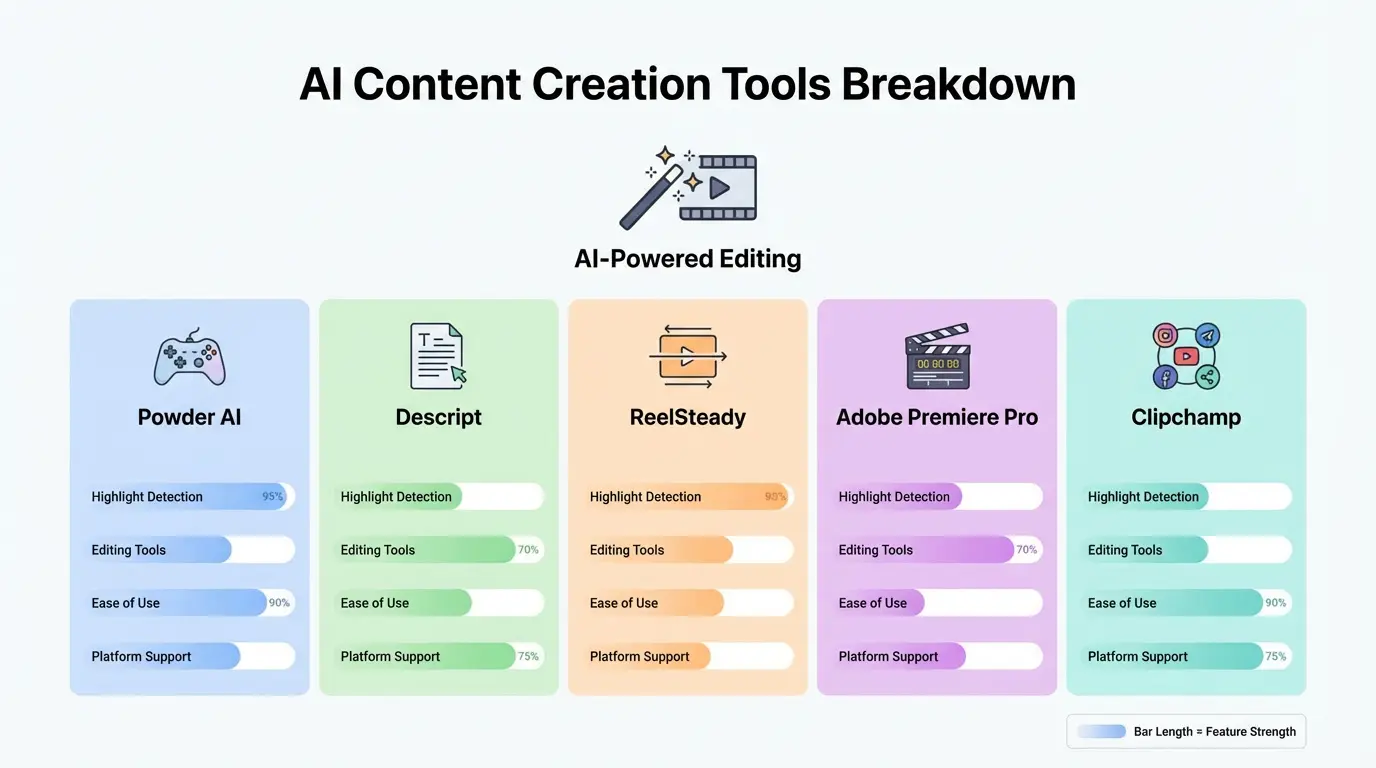
The table above is a snapshot of what each app offers. Depending on whether you value pure gaming clips, post‑processing polish, or cross‑platform flexibility, you’ll see a clear divergence between the options.
Choosing The Right Tool – A Step‑by‑Step Workflow
1. Identify Your Core Need
- Do you stream heavily on Twitch and need instant TikTok clips? Go for ClipGPT or Round‑Up.
- Is the focus on pure gaming highlight extraction? Powder AI remains a top pick.
- Need stabilization for mobile or drone footage? ReelSteady excels.
2. Check Platform Compatibility
Make sure the app integrates with the streaming platform you use. For example, if you’re a “PC PC gamer” on Twitch, Powder AI pulls directly from the TV capture while ClipGPT prefers a re‑upload of VOD files. Compatibility with your local media folder (MP4, MKV) is also important.
3. Test AI Accuracy on Sample Clips
Most services offer a free trial. Download a 30‑minute segment, let the AI analyze it, and then compare the generated clips with your own “hand‑picked” highlight list. Score each clip on relevance and timing.
4. Review the Post‑Processing Suite
If you’re marketing on social media, look for auto‑formatting (1:1, 9:16), template packs, or caption generators. ClipGPT’s virality score helps decide which clip is most shareable.
5. Factor in Pricing & Subscription Model
Free tiers often limit export quality or number of clips. If you stream full‑time, a paid plan could save hours of manual editing. Some services, like Clipchamp, have tiered plans for videos up to 1080p, while Powder AI offers a “Pro” tier tailored to high‑volume streamers.
Real‑World Success Stories
Streamer Aldo “Vortex” K. launched his Twitch channel in 2024 and used Powder AI to process 1,200 hours of gameplay in a single night. The autoprops feature turned eight top moments into TikTok‑ready clips, boosting his follower count by 28% within a month.
Conversely, the indie creator Jessian preferred ReelSteady because her mobile setup recorded in 4K from a DJI drone. Stabilization and real‑time trimming cut her post‑production time from 6 hours to less than 30 minutes.
Common Pitfalls to Avoid When Using Apps Like Powder AI
- Over‑Reliance on Automation – Let the AI do the first pass, but always double‑check the clip’s timing. A microphone hiss or quick camera pan might momentarily trip the algorithm.
- Ignoring Time‑Zone Settings – Automated upload features depend on accurate server time. A misaligned clock can delay your export or affect scheduling.
- Under‑utilizing Export Templates – Most present templates are curated for specific platforms. Skipping them often means extra manual resizing down the line.
Future Trends: AI‑Enhanced Video Editing
Looking ahead, the convergence of AI with cloud rendering promises real‑time highlight suggestions during a live stream. Early experiments by Adobe link the front‑end editing AI (Sensei) to live capture hardware, allowing the system to flash a small visual cue when a highlight is detected.
Another direction is the integration of sentiment analysis, where an AI not only sees motion but also gauges audience reaction via chat. This could open a new layer of engagement metrics for content creators.
Frequently Asked Questions (FAQs)
Q1. What defines a “highlight” for AI apps?
A1. Highlight detection blends audio spikes, motion thresholds, and sometimes context learned from game metadata. Settings can be tweaked for sensitivity.
Q2. Are these apps safe for my data?
A2. Reputable vendors store uploads in encrypted cloud storage and offer end‑to‑end encryption on local files. Check each service’s privacy policy for details.
Q3. Can I use an app like Powder AI for non‑gaming videos?
A3. While primarily tailored for gaming, core AI engines can work on any content with high motion—sports footage, vlog edits, or even dramatic talk shows.
Q4. Do the AI models require internet access?
A4. Most real‑time analysis runs locally, but exporting or uploading to social media may need an internet connection. Some offer offline “offline clip” modes.
Q5. What’s the learning curve for beginners?
A5. Most platforms feature drag‑and‑drop interfaces. The first time chaining AI clip extraction, trimming, and social‑media formatting can take ~15 minutes once you’ve logged into a trial.
Also Read: AI Car Audio Tuning: The Surprising Risks and Rewards in 2026