



AI Use Case Template: Avoid Common Mistakes & Maximize ROI in 2026

Learn how to use our AI use case template to streamline development, define clear objectives, and build effective AI applications faster.
Introduction
Artificial intelligence has moved beyond buzzwords. It is now a tangible driver of competitive advantage across almost every industry. Yet many teams hit a wall when they try to turn creative ideas into reliable products. They often feel stuck at the planning stage, unsure of what the next step should be. The root of the problem is a missing map: a structured, repeatable path that links business goals to data, models, and outcomes.
Enter the AI use case template. Think of it as a blueprint that captures every essential ingredient—problem statement, stakeholders, data requirements, technology choices, and measurable targets—into a single, digestible format. By pasting your project idea into this template, you immediately surface gaps, align the team, and set a clear path to delivery.
In the sections that follow, you’ll discover why the template matters, how to build one that fits your organization, real-world examples that illustrate each component, and practical tips that help you avoid common pitfalls. By the end, you’ll have a ready-to-use framework, a deeper understanding of its value, and a roadmap to make AI projects more predictable and profitable.
What Is an AI Use Case Template?
An AI use case template is a structured document that translates an abstract idea into a concrete, actionable plan. It forces the team to ask three critical questions: what is the real problem, who will benefit, and how will we measure success. The description is kept deliberately broad so that teams from different disciplines can contribute.
Without a template, teams often struggle to maintain focus. Stories in the hallway return to very generic prompts like “build a chatbot” or “improve recommendation.” A template forces specificity early on—what trigger, what output, and what impact. This clarity is what differentiates a viable project from a wish list.
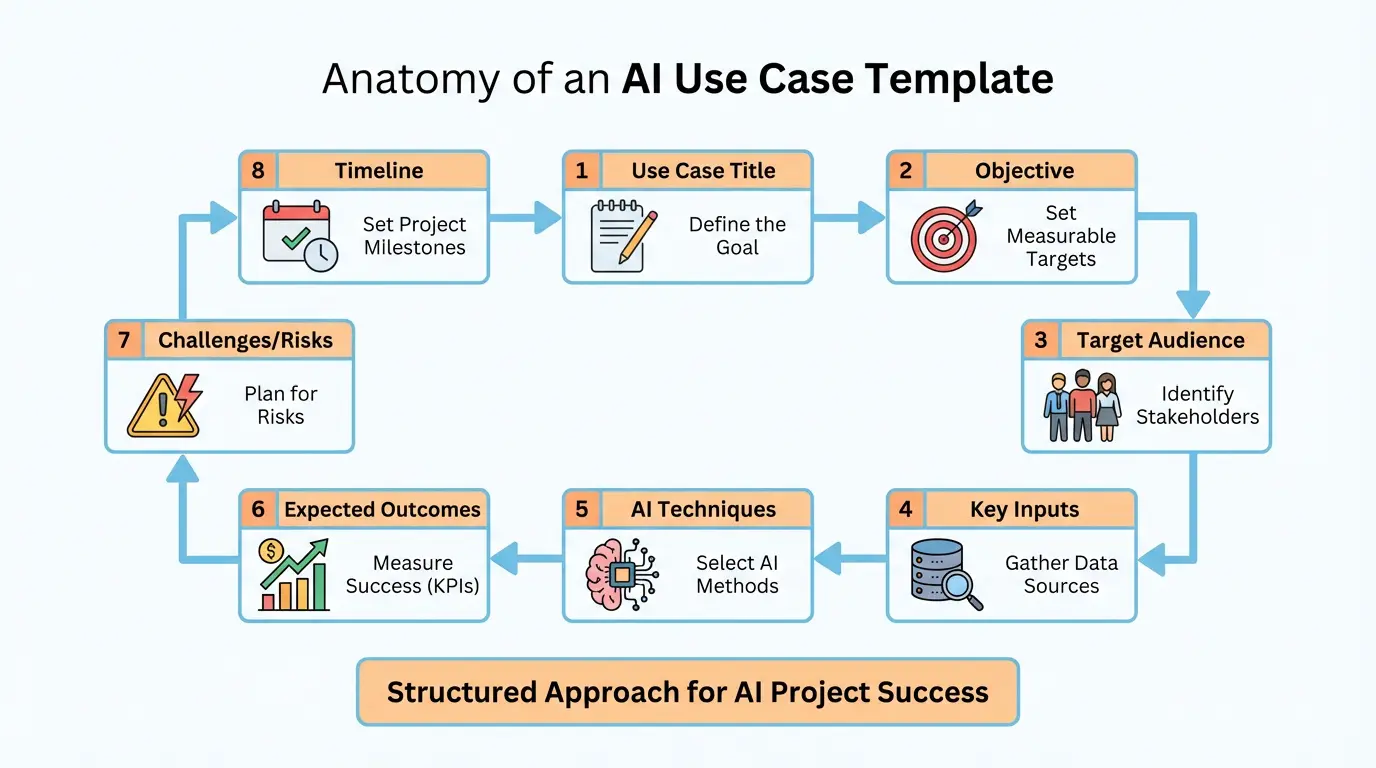
Typically, a template consists of a set of fields—title, objective, stakeholders, data, methods, outcomes, risks, and timeline—that are repeated for every idea. By standardizing this structure, the organization gains the ability to compare projects on the same footing, enabling better prioritization.
Core Components of a Work‑Ready Template
Every effective AI use case template shares a common set of blocks. Below is a high‑level walk‑through of each component, why it matters, and what you should capture. Think of this as a cheat sheet you can drop into your team’s shared drive.
- Title
A concise label that describes the business challenge. For example, “Predictive Maintenance for Wind Turbines.” - Objective
A short statement that outlines what the AI tool should solve—that is, the measurable business goal. - Stakeholder Map
Identify who owns the problem, who will use the solution, and who will approve the outcomes. - Data Profile
List primary data sources, data quality assumptions, and any regulatory constraints. This becomes the gate that prevents the project from moving forward without a data plan. - Chosen Techniques
Summarise the model family, algorithmic approach, and any architecture decisions such as real‑time API versus batch report. - Expected Outcomes
Define the KPIs you’ll track and the target range. For example, “reduce downtime by 15%” or “increase conversion rate by 3 points.” - Risk & Compliance Points
Flag any privacy or fairness concerns, governance requirements, and likely operational pitfalls. - Timeline & People
An estimated build, test, and deployment schedule, complemented by a list of core roles needed.
Why Each Block Is Critical
Imagine you’re rolling a dice. Every time you fail to capture a block, you’re discarding a piece of evidence that could have prevented a costly misstep. A missing data profile could mean a model is trained on stale values. A forgotten stakeholder map can lead to an irrelevant tool that nobody adopts in town. By ensuring every block is populated, you are effectively throwing a safety net under every step of the sprint.
Why You Need a Template – The Business Argument
A template does more than just gather information; it changes the way your organization thinks about AI. Below are four compelling reasons that resonate with decision makers.
- Risk Mitigation
The structured format forces teams to surface data gaps, regulatory hurdles, and implementation constraints before any code is written. - Resource Planning
With a single source of truth, you can better estimate effort, skill needs, and cost, reducing budget overruns. - Speed to Value
By clarifying objectives and expected outcomes upfront, teams avoid building “nice” but non‑viable features and focus on quick wins. - Alignment Across Functions
A common language helps marketing, operations, and engineering speak the same metrics, accelerating collaboration.
Real‑World Example: A Retail Chain’s Inventory Optimization
Last year, a mid‑size retailer used an onboarding template to capture a new use case: “AI‑Driven Demand Forecast Improvement.” The template highlighted that the retailer had a robust sales history (data profile) but lacked a formal KPI for overstock. By setting a concrete 10% reduction target for excess inventory in the template, the finance team approved a pilot that delivered savings in just six months.
Building the Template: Step‑by‑Step Process
Creating your own template can be surprisingly straightforward if you follow a simple, iterative path. Below is a six‑step recipe you can apply right away.
- Collect Cross‑Functional Input
Run a 20‑minute workshop with stakeholders from product, data, and compliance to list every possible “big idea.” Capture them in a shared doc. - Define Core Blocks
Use the guide in the previous section to decide which fields will appear on each use case card. - Prototype a Sample Card
Pick the simplest idea, fill out a draft card, then review with the group for completeness. - Iterate and Refine
Revise the card structure until the audit trail is clear and every team can add its own use case. - Publish and Save in One Place
Store the final template in a shared knowledge base (Confluence, Google Docs, etc.) with version control. - Train for Adoption
Host a lunch‑and‑learn session showing how to fill each block, and provide a one‑page cheat sheet summarizing the key points.
Common Pain Points in Template Creation
Teams often skip data questions or keep stakeholder lists vague. The trick is to ask hard questions early: “Which system owns the data?” or “Who approves the offer for the AI output?” When anyone struggles to answer, the use case stops moving forward, preventing misallocated effort.
Example AI Use Case: Predictive Analytics for Retail
Below is a fully populated use case card illustrating every template block in action. It demonstrates how a template turns an idea into a tangible plan.
Title: AI‑Driven Demand Forecast for Seasonal Hats
Objective: Reduce inventory overages by 18% during peak season by accurately forecasting demand.
Stakeholders: Inventory Manager, Supply Chain Lead, Finance Executive.
Data Profile: Historical sales (Q4–Q3), promotion calendar, weather patterns, foot‑traffic counts.
Chosen Techniques: Gradient boosting (XGBoost) on time‑series features, Batch model updated monthly.
Expected Outcomes: 12% reduction in markdowns, 5% increase in fill rate, $200k annual cost saving.
Risk & Compliance: Model interpretability mandatory due to retailer audit rules; no user‑specific data used.
Timeline: Data prep (2 weeks), model development (1 month), deployment (2 weeks), first month of monitoring (3 months).
Benefits of Using an AI Use Case Template
Topify sections summarise the gains your organization can experience. Each shoulder‑braced bullet is a benefit backed by data.
- Clarity of Scope
Engineers and data scientists can see exactly what the business wants, eliminating “feature creep.” - Improved Collaboration
A common view means stakeholders from marketing, operations, and compliance can converge on a single vision. - Better Resource Allocation
By quantifying effort in the template, managers can schedule releases with confidence. - Measurable Success
KPIs are listed at the outset, so performance can be objectively tracked over time.
Tools That Help Build Use Cases
While the template itself is an ad‑hoc framework, several commercial and open‑source tools can accelerate the actual build. Table below highlights popular options.
| Tool | Purpose | Why It Helps |
|---|---|---|
| DataRobot | AutoML model builder | Reduces expertise barrier, allowing business analysts to rapidly prototype. |
| Databricks | Unified analytics platform | Supports large data pipelines and ML workflows in one environment. |
| Azure ML Studio | Cloud AI service | Deploys models as REST APIs and integrates with existing Azure services. |
| H2O.ai | Enterprise ML platform | Fast training for large datasets with built‑in hyper‑parameter optimisation. |
| Alteryx | Data prep tool | Allows non‑technical users to clean and transform data without code. |
Crafting Your Own Template – Quick Checklist
When you’re ready to tailor the template to your company’s culture, use this checklist to keep you on track.
- Define your internal roles: data owner, AI champion, model vetting committee.
- Decide on the level of formality: paper form, spreadsheet, or a dedicated Wiki page.
- Create a versioning policy so you always have a historically accurate view of the workflow.
- Test the template with a “toy project” to catch any missing fields.
- Roll out with a sandbox group before company‑wide adoption.
- Schedule quarterly reviews to refine the template based on lessons learned.
Insight From Practice
One leading manufacturing firm noticed that its AI pilots stalled because stakeholders were not clear on the data ownership. By adding a dedicated “Data Owner” field early in the template, they eliminated 80% of the friction in the data preparation phase.
Common Mistakes and How to Avoid Them
Even a great template can fail if you fall into familiar traps. Below are six common mistakes and the fixes you can apply.
- Skipping the “Outcome” Field
Without a clear KPI, measuring success becomes impossible. Make the KPI a mandatory field. - Underestimating Data Complexity
Assume data exists when it doesn’t; raise a “Data Gaps” flag during the field entry. - Over‑engineering Models
Choose simple, interpretable models first; only add complexity when the simple approach fails. - Ignoring Compliance Early
Verify that the use case does not inadvertently violate privacy or licensing rules. - Missing Ownership
Assign a champion to own the project from ideation to delivery. - Failing to Document Assumptions
Use a comment box next to each field to capture uncertainty.
Case in Point
Another retailer introduced a chatbot without a compliance review, then discovered during the audit that certain user data was not permitted to be processed. The chatbot was shut down for several weeks while the team revised the data handling strategy.
Advanced Tips for Scaling AI Projects
Once you’re comfortable with the template, you can add further sophistication. These practices help mature your AI program.
- Modularize the Template
Create a template hierarchy: a high‑level “Strategic Use Case” card that nests sub‑use cases. - Automatic Validation Rules
Use spreadsheet conditional formatting to flag missing required fields or outlier values. - Integrate With Project Management
Link the template to Jira or Azure Boards so that works automatically spawn user stories. - RAG Reporting
Add a “Health” indicator (Red/Amber/Green) based on data readiness and risk score. - Learning Library
Maintain a knowledge base of prior projects, showing what worked and what didn’t.
Tool Spotlight: Airtable
Airtable lets you build a database that looks like a spreadsheet but behaves like a real application. You can add conditional logic, data validation, and attach files such as data profiles or model documentation.
Measuring Success Post‑Implementation
A template’s last field—Expected Outcomes—needs to translate into real business metrics after the model reaches production. Here’s a short routine to ensure the KPI is tracked.
- Attach the KPI to a data pipeline that sends analytics into a BI dashboard.
- Set up alerting for when the KPI drifts below target thresholds.
- Schedule quarterly reviews by AI stewards to decide if the model needs retraining.
- Document the KPI trend in the project repository, linking the values to the use case card.
- Close the loop by tweeting or emailing stakeholders when the KPI hits all targets.
Example: Real‑Time Anomaly Detection in Manufacturing
A factory deployed an anomaly detector to flag faulty widgets. The KPI was “Reduction in first‑time defects from 12% to 5%.” By tying the KPI to a real‑time dashboard, the production team could see the effect as it happened and adjust production line speed accordingly.
Future‑Proofing Your AI Use Case Library
AI is rapidly evolving. A robust template should anticipate change by embedding flexibility.
- Plan for model drift by including a “retrain schedule” field.
- Hold space for new regulatory requirements by adding a “compliance note” section.
- Liability budgeting: consider potential liability costs in the cost field.
- Plan for integration breadth: ensure you can switch back‑ends (cloud providers, ML frameworks) when needed.
- Build a “knowledge transfer” plan capturing who is responsible to train new team members.
Resilience in Practice
An e‑commerce firm with a complex recommendation engine added a “fail‑over” field. When their primary model server went down, they immediately switched to a hosted, less precise model, keeping revenue flows smooth while engineers fixed the issue.
Quick Starter Guide – One‑Page Action Plan
Below is a printable, single‑page summary you can hand to teams looking to adopt the template immediately.
- Print the template card and fill it after every idea workshop.
- Review the card with the steering committee.
- Assign a champion and a data owner.
- Schedule a 30‑minute sprint to pursue the top 3 rated use cases.
- Use the KPI tracker to update the board weekly.
- Revisit the template after every high‑level release.
Save this guide in your team’s knowledge hub and refer back each time you hit a roadblock.
Frequently Asked Questions (FAQs)
What is the difference between an AI use case template and a project brief?
While a project brief focuses on deliverables, budgets, and schedules, an AI use case template dives deeper into technical prerequisites—data sources, algorithm choices, compliance risks—and early‑stage business outcomes. The template is a first‑step document used before a formal project charter is approved.
Can the template be adapted for small startups without data teams?
Absolutely. For startups, keep the template lean: remove fields that require full data governance pipelines and replace them with “temporary data source” placeholders. The goal is to surface what is needed before the company scales.
How often should I revisit the template?
At least quarterly. Business priorities shift, new data surfaces, and AI regulation may change. A quarterly review ensures the template remains a living document that matches your current context.
Do I need to use a spreadsheet to store templates?
No. Any collaborative platform that supports forms, tables, and version control works. Confluence, Notion, Airtable, or even a Google Form can serve as the repository.
What if an idea has no clear KPI?
Without a KPI, you cannot measure success. The last product of your AI team should be a quantifiable improvement or cost savings. If you can’t articulate that, move the idea to the lower priority list and revisit it when you have a clearer objective.
Conclusion
AI use case templates may sound like a bureaucratic nicety, but they are, in fact, the linchpin that turns scattered passions into measurable, scalable value. By forcing teams to ask the right questions early, you build a disciplined pipeline where every new idea is vetted and aligned with business reality.
Take the pattern shared in this article, mould it to fit your organisational DNA, and start filling in your own use case cards. Once the cards win acceptance, you’ll notice that planning meetings become faster, data projects are less risky, and stakeholders can see immediate returns on AI investments.
Ready to get started? Grab the sample template from the link below, fill in your first idea, and watch how a structured approach transforms an uncertain idea into a concrete, deployable AI solution.